truendBusiness

Billing and stock, built around the IMEI.

truend Business is for shops that sell phones, laptops and accessories, and buy used ones across the counter. Scan a phone onto the bill, take UPI on your own QR code, hand over a GST invoice, and check the day’s takings from your phone.

Start free for 30 days See a sale, step by step Sign in with your mobile number. No card needed.
New Bill on the counter PC: a Samsung Galaxy A36 5G with its IMEI and a silicone case on the bill, amount due ₹33,199
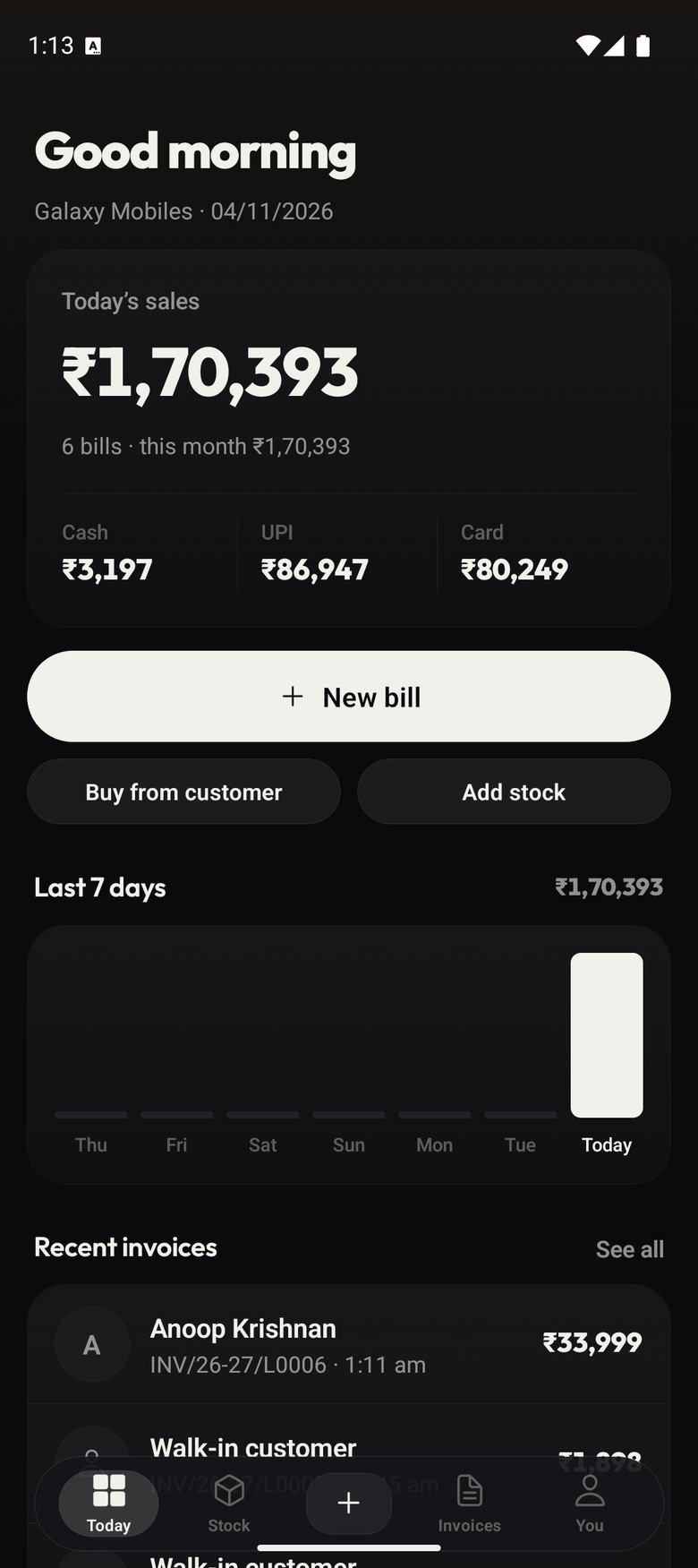
Today on the owner’s phone: ₹1,27,207 in sales from 4 bills, with cash and recent invoices
The right GST documentTax invoice, bill of supply or a plain bill, set by how your shop is registered.
IMEI 1 and 2 on every phoneChecked for typos as you scan or type, printed on the bill for warranty.
Bills with no internetUploads on its own when the connection comes back.
English and മലയാളംSwitch the whole app in Settings, any time.

Why shops switch

Most phone shops run on a notebook, a billing program and memory.

General billing software treats a phone like a packet of biscuits. The IMEIs end up in a notebook, used phones get bought for cash with nothing written down, and the owner rings the shop to ask how the day went.

TodayWith truend Business
IMEIs copied into a notebook and found by turning pages.Every phone is stored by its IMEI. Type it in the search box and the phone, its bill and its buyer come up.
Stock counted as “12 phones”, with no idea which 12.Phones, laptops, consoles and watches tracked one by one. Cases, cables and glass by count, with a low-stock alert.
A used phone bought for cash, and nothing on paper.A numbered purchase voucher for every buy-in, with who you bought it from and what you paid. The phone goes straight into stock.
The drawer counted at night against a guess.Close the day: expected cash, UPI and card against what you counted, then sent to the owner.
Profit worked out at the end of the month, roughly.Profit by brand, model and category for any period, plus the stock that isn’t moving.

How a sale works

From scanning the box to the customer’s invoice.

New Bill with a phone and its IMEI on the bill

Stock

Every phone kept by its IMEI, not just a count.

Open any phone and see what you paid, what it sells for, how long it has been on the shelf and everything that has happened to it since it came in.

  • Phones by IMEI; laptops, consoles and watches by serial number
  • Accessories by count — with a low-stock alert you set per item
  • Stock value at cost and at selling price, on one screen
A used Apple iPhone 14: IMEI, grade A, selling price ₹52,000, cost ₹40,600, margin ₹11,400, and its history

Buy from customer

Buy a used phone across the counter in under a minute.

Scan the IMEI, tap the brand, model, storage and condition, enter what you pay and what you’ll sell it for. It goes into stock with a numbered purchase voucher.

  • Take a phone in exchange on a bill — it comes off the amount due
  • Margin-scheme GST on used phones, worked out for you
  • Buy back a phone you sold before — its earlier history comes with it
Buy from customer: category, IMEI, brand, storage, RAM, colour and condition, with the purchase voucher alongside

Reports

See what you actually made, not just what you sold.

Sales, profit and margin for today, this month or any dates you pick, broken down by brand, category or model. The slow-stock list shows what’s been sitting too long.

  • Staff-wise sales — who billed what
  • GST summary for the period
  • Accounts export for Tally, or CSV for any other software
Reports for this month: 6 bills, ₹1,66,684 in sales, ₹19,114 profit, and sales by brand with cost and margin

Listings on truend

Put stock on truend from the same screen.

Switch a phone to “List on truend” and it shows up on the truend app and truend.in. Buyers’ messages come into the shop, and when the phone sells at your counter the listing comes down by itself.

  • Views and enquiries for each listing
  • Nothing private goes up — never your cost price or the IMEI
Listings on truend: 7 live listings with 1,730 views and 7 enquiries

On your phone

The whole shop in your pocket, not just the counter.

The same shop on the counter PC and on your phone, kept in step. Check today’s sales from home, look up an invoice when a customer calls, or bill from the phone when the counter is busy.
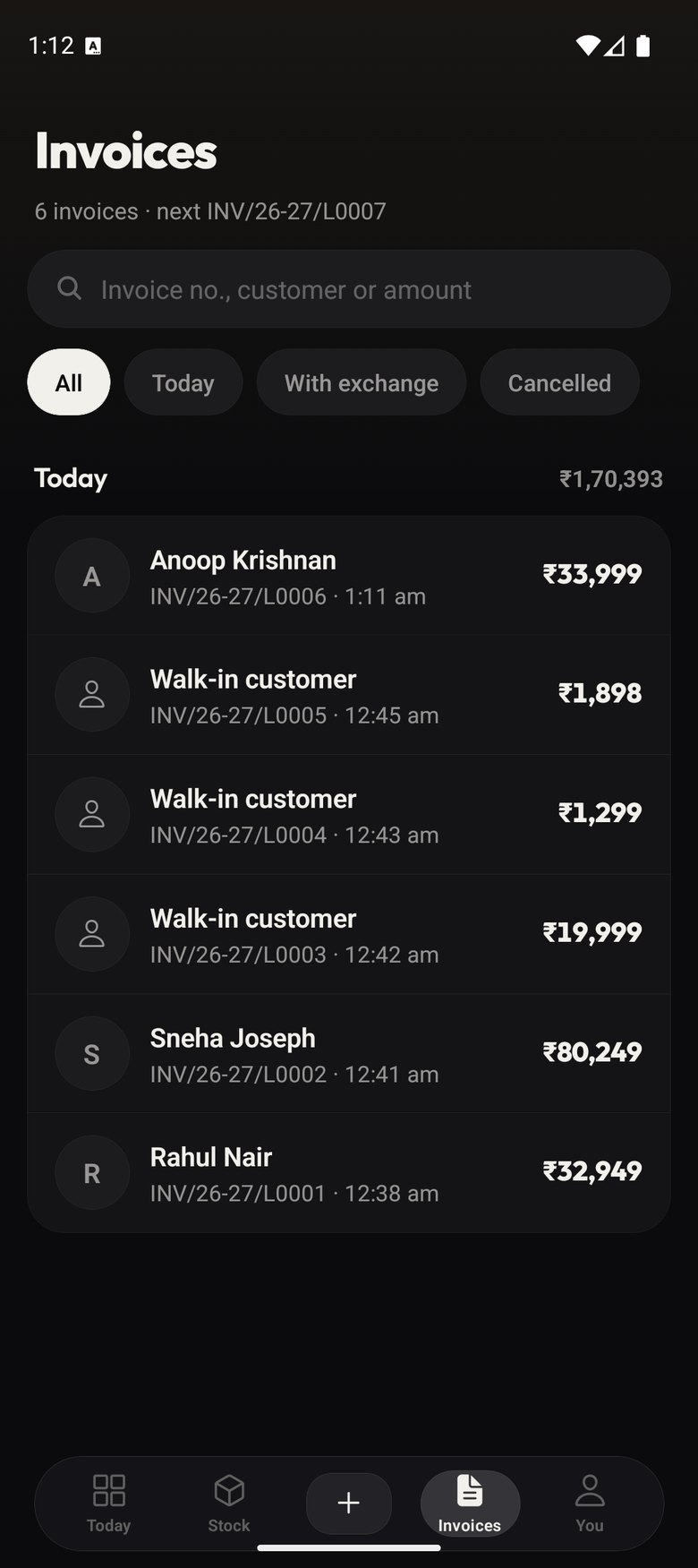
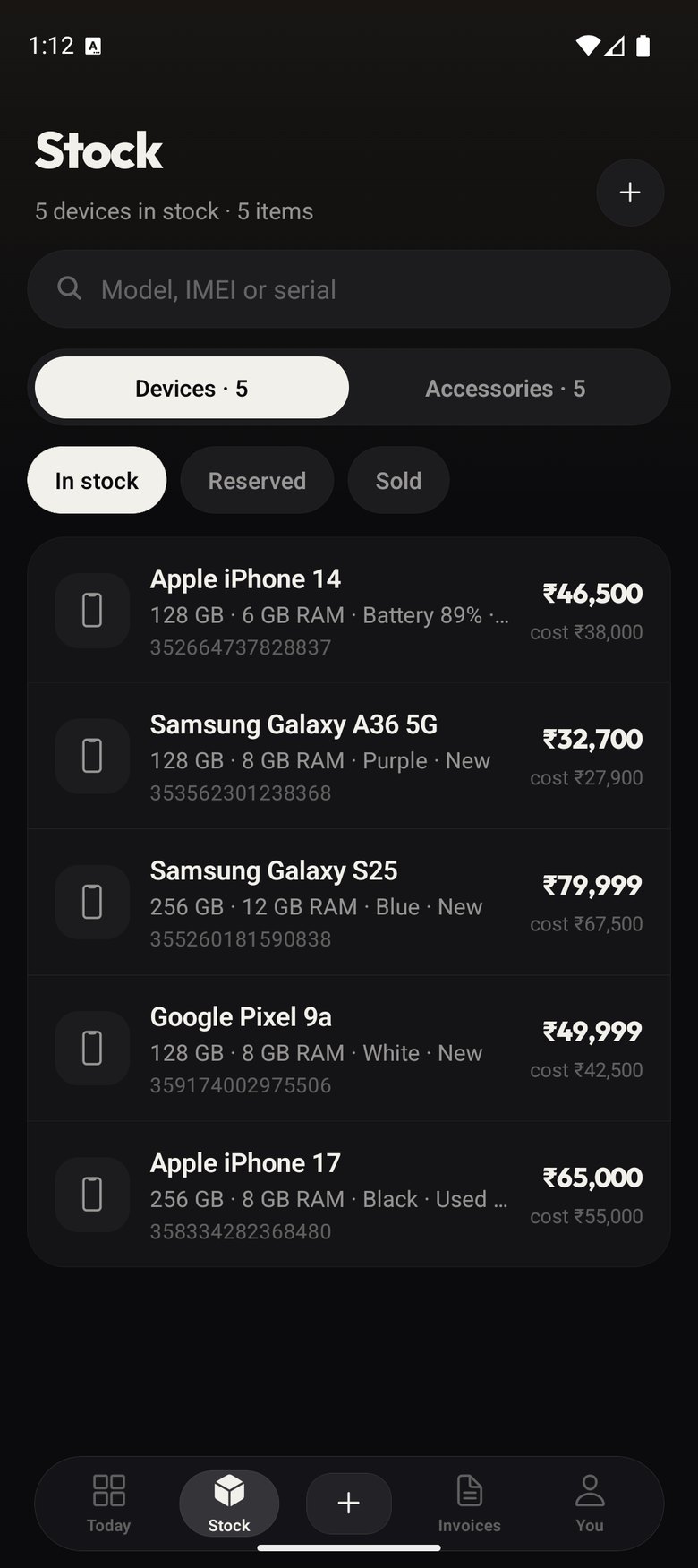
Today: sales, cash and recent invoices
TodaySales by cash, UPI and card, and every bill as it’s made.
Invoices list with search and filters
InvoicesFind any bill by number, customer, phone or IMEI.
Stock: 42 devices and 304 accessories, with stock value at cost
StockWhat’s on the shelf and what it’s worth.

Your staff, on their own logins.

Add someone with their name and mobile number. They sign in with an OTP and land in your shop. Make them staff, view-only or an admin, and choose which parts of the app each admin can see. Remove them and they’re out on every device.

Offline and more than one counter

Two counters, no internet, no clashing invoice numbers.

Each device bills in its own series, so two counters never hand out the same number. Turn the internet off below, make a few bills on each, then turn it back on.

Counter PC

series GM/26-27/

    Owner’s phone

    series GM/26-27/B

      Your shop online

      0 bills

        Bills show up here once they upload.

        Bills upload as soon as they’re made.

        Pricing

        One price per shop. Start with 30 days of Pro.

        Starter

        One counter

        ₹349/ month

        • GST billing, invoices and buy-in vouchers
        • IMEI and serial-wise stock
        • Reports and accounts export
        • 1 billing counter
        • Up to 15 live listings on truend
        Start free for 30 days

        Pro

        For busier shops

        ₹799/ month

        • Everything in Starter
        • Up to 3 billing counters
        • Up to 10 staff logins, each with its own role
        • Unlimited live listings on truend
        • More than one shop under one owner — ₹399 a month per extra shop
        Start free for 30 days

        Every new shop gets all of Pro for 30 days, no card needed. When the trial ends you choose a plan in Settings → Plan. Your bills and stock stay exactly as they are.

        Install

        Put it on the counter PC and your phone.

        Windows PC

        1. Open this page in Chrome or Microsoft Edge.
        2. Click Install on this computer.
        3. It gets its own icon on the desktop and in the Start menu, and opens in its own window.

        Android phone

        1. Open truend-business.web.app in Chrome.
        2. Tap the menu, then Install app.
        3. Sign in with the same mobile number to see the same shop.

        iPhone

        1. Open truend-business.web.app in Safari.
        2. Tap Share, then Add to Home Screen.
        3. Sign in with the same mobile number.

        Questions

        What shop owners ask first.

        Does it need the internet?
        Only to sign in the first time. After that it opens and bills offline, and everything uploads when the connection is back.
        My shop isn’t GST registered.
        Choose “No GST number” when you set up. You get plain bills with no tax on them, and you can switch to regular or composition later in Settings.
        We’re on the composition scheme.
        It issues a bill of supply with the line the rules require, and no tax charged to the customer.
        Will my barcode scanner and printer work?
        Any USB scanner that types into the computer works, and so does the phone camera. Bills print on 80 mm and 58 mm thermal printers or any A4 printer the PC can use.
        How do my staff sign in?
        With their own mobile number and an OTP. You add them in Settings → Team, pick their role, and remove them whenever you need to.
        Can my accountant get the books?
        Reports → Accounts export gives Tally XML and CSV day book, sales and purchase registers for the period you choose.
        What if I bill the wrong thing?
        Cancel the invoice from the bill itself. The stock goes back on the shelf and the cancelled invoice stays on record, as GST rules expect.
        Where is my data kept?
        In your shop’s own account, separate from every other shop. You can download a full copy any time from Settings.

        Try it on your own counter for 30 days.